| How to use credit/debit card with paypal/paypal direct payment |
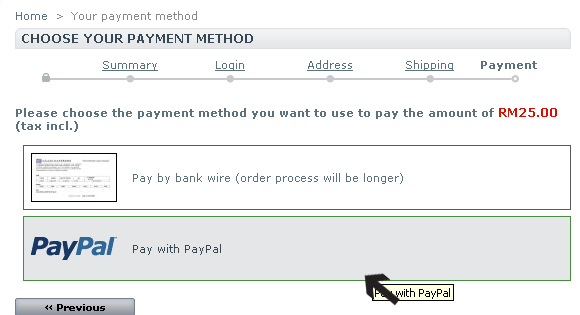
| 1)After check out go to payment method,choose paypal as payment method |
 |
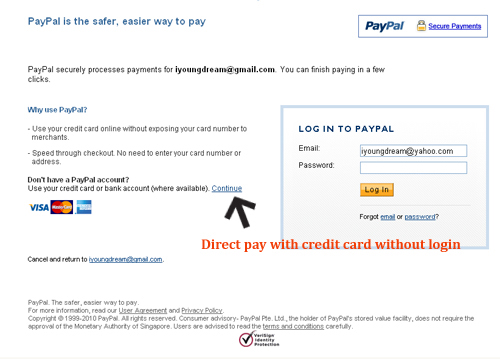
2) System will redirect go to paypal page.You will see the amount to pay shown on top of the page.
Option 1: If you have existing paypal account, you may login into paypal and proceed for payment
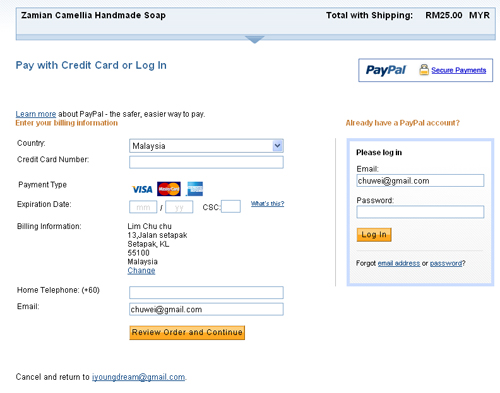
Option 2: If you direct pay with credit card without paypal account,kindly fill in your credit card information and click continue
|
 |
 |
| 3)System will redirect to confirm page to verify all the information filled.(you may add in some notes to us regarding your order) |
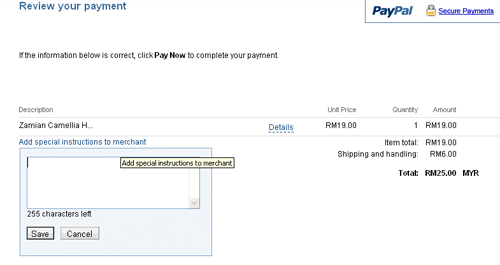 |
| 4)Once confirm all the information,please click the "Pay Now" button.We will proceed your order instantly. |
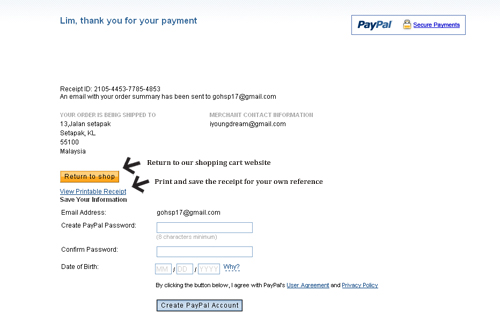
| 5)Once system bring you go to this page, means your payment has been made successfully. |
 |
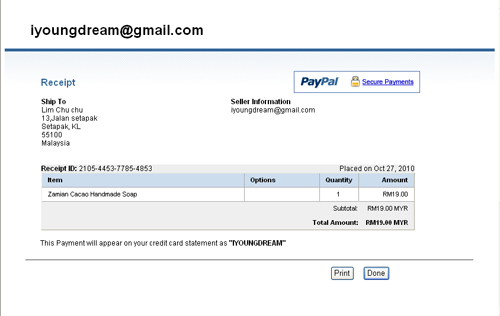
| 6)Print receipt. |
 |
| Note: Paypal is a secure payment and it won't disclose your credit card information to outsider.For more information about payment with credit card using paypal,kindly refer to www.paypal.com/my |
|

 Online Purchase/Member Corner
 Order Information


